![10 best daily planner software for teams [2026]](https://img.planningmethodjournal.com/images/news/2026/10/24/205ea25c6d7eab8058e3fdbf18396155aafcfe48b37cdd386c2fd842caf28e55.jpg)
Disconnected task lists can leave colleagues pursuing separate priorities. Shared daily planning software brings assignments, schedules, and broader goals together so teams can coordinate their work.
Understanding daily planner software
A modern daily planner provides a central place to organize tasks and connect individual responsibilities with team priorities. Beyond scheduling, shared dashboards give colleagues a common view of what matters and how work is progressing.
Why shared planning matters
Coordinating across time zones, inboxes, and applications becomes easier when tasks, owners, deadlines, and status reports live in one work hub. Real-time visibility reduces the need to chase updates.
That shared perspective also helps teams identify obstacles sooner, distribute work more evenly, and stay aligned with fewer check-in meetings. Instead of responding only when deadlines approach, teams can plan ahead.
Features worth looking for
- Connections to existing tools: Integrations with applications such as Google Calendar and Slack can consolidate information and reduce app switching.
- Live collaboration: Task comments, status updates, and immediately visible changes keep colleagues informed.
- Flexible views: Calendars and timelines let teams organize schedules in formats suited to their work.
- Access across devices: Desktop, mobile, and offline access matter when colleagues need current information away from their desks.
Choosing a planner for your workflow
Look for software that accommodates your processes rather than forcing work into a rigid structure. monday.com, for example, offers a flexible platform that can be adapted to a team’s approach.
First, map daily coordination routines and identify bottlenecks. Next, list essential calendar and messaging integrations and check how well they synchronize. Finally, consider whether colleagues will find the tool comfortable enough to use every day.
1. monday.com
monday.com combines visual task boards, integrated time tracking, and no-code automation in a shared workspace. It suits teams that want to connect personal assignments with wider objectives while coordinating progress across departments.
Core capabilities
- Adaptable boards with Kanban, Timeline, Gantt, calendar, and table views.
- Item-level time tracking without additional plug-ins.
- Automation and integration “recipes” for actions such as notifying colleagues, moving items, and creating documents.
- External guest collaboration starting with the Standard plan.
- AI Assistant for drafting tasks, identifying risks, and developing project plans; credits are limited by plan, with more available to purchase.
- More than 200 native application integrations.
- Dashboards combining several boards to show current progress, budgets, and workloads.
AI-assisted planning
The AI assistant can turn a request for a June product launch timeline into a project plan containing deadlines and dependencies, reducing manual planning work. Its suggestions draw on existing workflows and company execution patterns, allowing different support for marketing and development teams. Each plan includes AI credits.
No-code automation
A visual recipe builder handles recurring planning work. For example, completing a task can notify the next owner and change the project status; an approaching deadline can move a high-priority assignment higher in daily plans.
Automation scope varies by plan. Free users can automate basic morning check-ins, while Pro teams can create more elaborate workflows, including reprioritizing work when a client emergency arrives by email.
Connected workflows
With over 200 integrations, monday.com can connect scheduling and operational tools. A 9:00 AM Zoom meeting from Google Calendar can appear alongside preparation tasks and relevant documents. Zendesk requests can become assigned tasks, completed Figma designs can update timeline statuses, and HubSpot leads can initiate sales follow-up sequences without manual updates.
Plans and pricing
- Free: $0 forever; 2 seats, 3 boards, 500 MB storage, and restricted views and automations.
- Basic: $9/user/mo; unlimited items, 5 GB storage, and a dashboard covering one board.
- Standard: $12/user/mo; Timeline and Gantt views, guest access, plus monthly allowances of 250 automations and 250 integration actions.
- Pro: $19/user/mo; private boards, chart view, formula column, advanced time tracking, and 25,000 automations & integrations per month.
- Enterprise: Custom pricing; enhanced reporting and analytics, multi-level permissions, enterprise security and governance, and increased automation/integration limits.
Notable strengths
The colorful drag-and-drop interface supports both straightforward planning and complex enterprise workflows. AI-generated plans and bottleneck identification, integrated time tracking, and a broad integration marketplace make it particularly relevant to visually oriented teams seeking substantial automation and consolidated task and timesheet management.
2. Asana
Asana emphasizes task coordination and alignment between everyday work and business strategy. Its “Work Graph” technology connects assignments with broader objectives, making it suitable for teams seeking that visibility in an approachable interface.
Core capabilities
- Timeline, calendar, and Kanban views provide different ways to plan work.
- Asana Intelligence supports AI-assisted task management and workflow automation.
- Goal-setting tools connect daily assignments to strategic outcomes.
Plans and pricing
- Personal: Free forever for up to 10 teammates.
- Starter: $10.99 per user/month with annual billing, or $13.49/month with monthly billing.
- Advanced: $24.99 per user/month with annual billing, or $30.49/month with monthly billing.
- Enterprise and Enterprise+: Each requires a custom quote from sales.
- Annual Starter and Advanced subscriptions receive a 50% nonprofit discount.
- Paid subscriptions require at least 2 users.
Limitations to consider
Each task has only one assignee at a time, which can constrain some collaborative processes. Advanced functionality also takes more time to learn and may require training.
3. Trello
Trello uses movable cards on Kanban-style boards to make planning visual and straightforward. It fits individuals and teams that prefer simple organization over sophisticated project management.
Core capabilities
- Drag-and-drop task cards on visual Kanban boards.
- Butler automation for recurring planning activities.
- Over 200 Power-Up integrations connecting other tools and planning applications.
Plans and pricing
- Free: $0; up to 10 collaborators in each workspace, unlimited cards, and a maximum of 10 boards.
- Standard: $5 per user/month, billed annually; unlimited boards and advanced checklists.
- Premium: $10 per user/month, billed annually; additional views and AI functionality.
- Enterprise: $17.50 per user/month, billed annually; enhanced administration and security.
- Discounts are available to educational and nonprofit organizations.
Limitations to consider
Detailed reporting and advanced scheduling needs can exceed Trello’s capabilities. Boards may also become crowded and harder to manage as planning grows more complex.
4. ClickUp
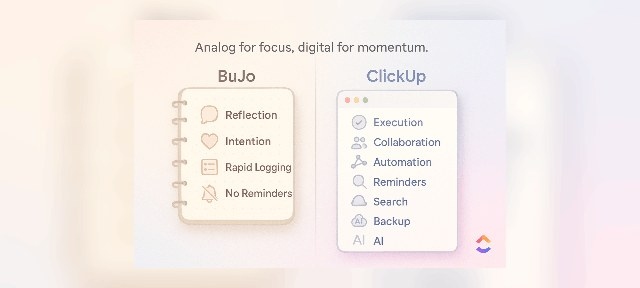
ClickUp brings daily assignments and complex projects into a highly customizable workspace. It is aimed at teams seeking to replace several productivity applications with one adaptable platform.
Core capabilities
- Planning views include calendars, Gantt charts, and Kanban boards.
- ClickUp Brain generates task summaries and AI-based workflow suggestions.
- More than 100 ready-made automation recipes support repetitive planning work.
Plans and pricing
- Free Forever: $0; unlimited users and tasks with 60MB storage.
- Unlimited: $7/user/month; 2GB storage for each user, plus unlimited integrations and custom fields.
- Business: $12/user/month; unlimited storage and enhanced dashboards and reporting.
- Enterprise: Custom pricing; white labeling, advanced permissions, and dedicated support.
Limitations to consider
The extensive feature set can make onboarding demanding. Reports of bugs and slow performance also arise when the platform handles large volumes of data.
5. Smartsheet
Smartsheet combines a spreadsheet-style interface with enterprise planning tools. It suits organizations that want to progress from basic tracking to portfolio management without leaving a familiar spreadsheet environment.
Core capabilities
- Grid, Gantt, calendar, and card (Kanban) views.
- No-code automation for recurring work.
- Reporting and dashboards that aggregate multiple data sources for live insights.
Plans and pricing
- Pro: $7 per user/month with annual billing.
- Business: $25 per user/month with annual billing.
- Enterprise: Custom pricing.
Limitations to consider
Complex formulas and advanced automation can require substantial learning. Compared with newer planning applications, the interface may feel dated.
6. Wrike
Wrike targets complex, cross-functional work with configurable project structures, enterprise security, AI automation, and resource planning. It is particularly suited to large organizations that need extensive customization across departments.
Core capabilities
- Custom item types and workflows tailored to organizational processes.
- Work Intelligence AI for predicting risks, automating tasks, and generating content.
- Resource tools supporting capacity planning and workload distribution.
Plans and pricing
- Free: $0/month; limited basic task and project management.
- Team: $10 per user/month for 2-15 users; unlimited projects and 2GB storage.
- Business: $25 per user/month for 5-200 users; advanced reporting and 5GB storage.
- Enterprise: Custom pricing; enhanced security and 10GB storage.
- Pinnacle: Custom pricing; advanced analytics and 15GB storage.
- Every plan includes a 14-day free trial.
Limitations to consider
Newcomers, especially those without project management experience, may find the learning curve challenging. Smaller teams that do not need advanced capabilities may struggle to justify higher-tier costs.
7. Airtable
Airtable pairs spreadsheet familiarity with relational database capabilities. Its adaptable structure suits teams that want to develop customized planning systems, expanding from simple task lists to complex projects without changing platforms.
Core capabilities
- Grid, Kanban, Calendar, and Gantt views for different scheduling perspectives.
- Custom fields and relational databases linking assignments, projects, and resources.
- A wide template selection covering uses such as content calendars and project roadmaps.
Plans and pricing
- Free: $0/month; up to 5 editors and 1,000 records per base.
- Team: $20 per user/month with annual billing; 50,000 records and unlimited editors.
- Business: $45 per user/month with annual billing; advanced capabilities and 125,000 records.
- Enterprise Scale: Custom pricing for large organizations requiring greater scalability.
Limitations to consider
Building workflows across interconnected tables can be difficult to learn. Very large datasets may reduce performance, although recent updates have significantly improved this.
8. Plaky
Plaky offers visual project planning with a free tier covering unlimited users, projects, and tasks. Its approachable design makes it relevant to small teams and organizations adopting digital planning, particularly those seeking substantial core functionality without a subscription.
Core capabilities
- Task visualization through lists, Gantt charts, and Kanban boards.
- Custom fields and conditional coloring for organization and prioritization.
- Live collaboration through comments, @mentions, and shared files.
Plans and pricing
- Free: $0; essential task management for unlimited users.
- Pro: $3.99 per seat/month with annual billing, or $4.99/month with monthly billing.
- Enterprise: $8.99 per seat/month with annual billing, or $10.99/month with monthly billing.
- Bundle: $12.99 per seat/month with annual billing; includes team communication and time tracking tools.
Limitations to consider
Integrations are narrower than those of established competitors, with Clockify time tracking serving as the primary connection. Mobile issues have also been reported, including Android login failures and crashes.
9. Motion
Motion uses AI to place tasks directly into a calendar and adjust the schedule as meetings or deadlines change. It suits individuals and teams seeking automatic planning rather than repeated manual rescheduling.
Core capabilities
- Automatic task scheduling based on availability, priority, and deadlines.
- Live schedule adjustments when meetings or urgent requests arrive.
- Project management incorporating dependencies and team workload balancing.
Plans and pricing
Paid subscriptions are offered for individuals and teams. The article’s reviewed sources did not provide specific prices; consult Motion’s website for current details.
Limitations to consider
Motion is known to cost more than many conventional planners. People who prefer free-form scheduling may find its structured, AI-led approach restrictive.
10. Sunsama
Sunsama emphasizes deliberate planning, work-life balance, and sustainable productivity rather than filling every available hour. This premium planner suits professionals who prefer guided reflection and prioritization to automatic scheduling.
Core capabilities
- Guided planning routines for daily and weekly reflection, prioritization, and scheduling.
- Connections with Google Calendar, Asana, Trello, ClickUp, and Slack to gather tasks from other platforms.
- Timeboxing, focus mode, and an integrated Pomodoro timer to support concentrated work.
Plans and pricing
- Individual plan: $20/month with monthly billing, or $16/month with annual billing.
- A 14-day free trial is available, but there is no free forever tier.
Limitations to consider
At $20/month, Sunsama sits among the more expensive daily planning applications. Its mobile version lacks some desktop functionality; core tools such as time blocking are desktop-only.
Building a shared planning routine with monday.com
Teams can use monday.com to establish repeatable planning workflows and connect their existing tools. Bringing information into a shared source helps align daily tasks with priorities and reduces reliance on status meetings.
Frequently asked questions
How do daily planners differ from project management platforms?
Individual daily planners focus on personal task lists. Work management platforms such as monday.com coordinate shared workflows and goals across a team.
Can planners connect with business applications?
Most provide basic integrations. Work management platforms offer deeper connections with core tools such as Slack and Google Workspace, bringing work together and reducing application switching.
When is a paid planner preferable to a free one?
Free options can serve personal task management well. Growing teams may need the additional collaboration, automation, and security available through paid platforms.
Are these tools secure enough for business?
Protection differs between products. Business users should look for enterprise-grade safeguards such as SOC 2 compliance. monday.com offers robust security intended to protect work without adding complexity.
Do daily planners support collaboration?
Traditional planners are primarily designed for individuals. Work management platforms instead connect personal assignments into a shared, actionable team plan.
How quickly can a team introduce planning software?
An intuitive platform such as monday.com can be introduced within days rather than months. A flexible system allows teams to begin with simple processes and develop more advanced workflows as confidence grows.