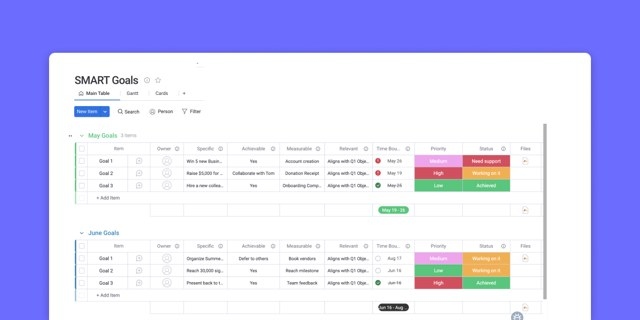

A productive week starts with deciding what deserves your time before deadlines, meetings, and incoming requests make that decision for you. Weekly planning provides a repeatable way to organize real commitments—not an ideal schedule that falls apart after the first interruption.
The approach below combines six planning steps with practical ways to prioritize, protect focus, and adjust as work changes. A brief daily check, incorporated into your morning routine, can help keep those priorities visible.
What makes a weekly plan useful?
Weekly planning means deciding in advance what needs to move forward, when you will work on it, and in what order. Rather than letting the loudest email determine your agenda, you establish priorities and fit other demands around them. That can reduce daily uncertainty, ease stress, and preserve time for goals that otherwise get crowded out.
The wider productivity challenge is substantial. Research from Gallup’s State of the Global Workplace finds that only about two in ten employees are engaged at work, with low engagement costing trillions of dollars in lost productivity annually. Planning alone cannot solve disengagement, but it offers a reference point so one interruption does not redefine the entire week.
The most useful plans follow a recurring cycle: review what happened, choose priorities, and schedule the work. They reflect actual time demands, account for energy levels, and leave space for surprises. A connected workspace can also bring tasks, deadlines, and team capacity together so the plan remains actionable.
Why a carefully written plan can still fail
A schedule can look achievable on Monday and become impossible by Wednesday if it rests on optimistic assumptions. Common causes include:
- Underestimating duration: allowing an hour for work that regularly takes two pushes every later commitment back.
- Assuming uninterrupted days: urgent requests, illness, and other disruptions become schedule-breaking events when no room exists for them.
- Relying on memory: overlooking what actually happened last week leads to repeated overload and missed follow-ups.
- Filling every available slot: a fully booked calendar has no capacity for unexpected work.
The answer is not simply greater discipline. Use evidence from previous weeks, allow realistic task durations, and leave deliberate gaps.
Six steps to a realistic weekly schedule
Follow these steps in order each week, adjusting the time you spend on them to suit your work. Repetition makes the process quicker and your estimates more accurate.
1. Review the previous week
Spend two minutes checking last week’s calendar or plan. Identify completed work, unfinished tasks, and items you never started. Consider what helped and what needs to change.
Repeated carryovers signal a pattern worth addressing. Perhaps demanding work coincided with an afternoon energy dip, or consecutive meetings left no time for follow-up. Use those observations to shape the next schedule.
2. Capture everything you need to do
On a blank sheet of paper, list every task occupying your attention. Include current projects, future ideas, follow-ups, one-off requests, and personal responsibilities such as groceries or household chores. Do not limit the list to work or immediate deadlines; the goal is to get the full set of commitments out of your head.
3. Decide which priorities matter most
With everything in one list, assess tasks by impact rather than treating them as equally urgent. The MoSCoW method offers four categories:
- Must: tasks with firm deadlines or meaningful consequences if delayed.
- Should: important work that can move a day or two without causing harm.
- Could: worthwhile extras to tackle only if capacity remains.
- Won’t: work you deliberately exclude from this week.
For a simpler approach, choose three main goals and reserve capacity for them before adding other work. Whether you use a notebook or a project task list, make those priorities explicit.
4. Give tasks realistic deadlines
Record when each item genuinely needs to be finished. Challenge the assumption that everything must happen today or tomorrow, but avoid postponing all work until the last possible moment. Both unnecessary urgency and last-minute rushing create avoidable stress.
For longer-term projects without deadlines, choose an ideal “start by” date or maintain a separate running list of lower-priority projects. A reusable weekly work-plan format can help arrange tasks and dates consistently.
5. Reserve calendar time for the work
Keep tasks due beyond the coming week on your master list for future reviews. For work due this week, place each item on its due day and estimate the time required, accounting for meetings and other commitments. A project management system can help organize this information.
Then turn those entries into time blocks with specific start and end times. Treat them as commitments, much as you would meetings with other people. Batch similar activities together to reduce switching between different kinds of work.
Allow more time than your best-case estimate. For example, reserve 45 minutes for editing a memo that normally takes 30 minutes. Keep some of each day unbooked so urgent calls, illness, or project obstacles do not immediately derail the schedule.
On monday.com, Calendar and Timeline views display tasks, deadlines, and meetings across the same week. This makes overloaded days easier to identify while there is still time to move work.
6. Add buffers deliberately
Even sensible estimates need breathing room. Build flexibility into the schedule rather than counting on everything finishing exactly on time:
- Add 15 minutes to events lasting an hour or longer.
- Leave one or two open blocks each day for urgent work, illness, and unforeseen requests.
- Treat unscheduled capacity as part of the plan, not an invitation to add more tasks immediately.
These buffers let you absorb overruns and urgent demands without shifting every commitment that follows.
Schedule work around your energy
Your capacity for demanding work changes throughout the day and week. Instead of assigning tasks solely by available time, consider the level of attention they require:
- High energy: protect peak periods for complex or creative activities such as strategy, writing, and problem-solving.
- Moderate energy: handle email, follow-ups, reviews, and reporting that require attention without full concentration.
- Low energy: reserve quieter periods for administration, organizing files, expense reports, and other routine work.
Track your energy for a week to identify your own pattern. Then move demanding tasks into your strongest windows and routine work into the dips. Combined with time management strategies, this avoids using your sharpest hours on your easiest tasks without requiring a minute-by-minute schedule.
Combine themed days with time blocks
Time blocks structure individual days; themes give the week a broader rhythm. Assigning similar work to dedicated days reduces context switching compared with scattering every activity throughout the week. One possible arrangement is shown below:
| Day | Theme | Typical work |
|---|---|---|
| Monday | Planning day | Weekly review, priorities, and setup |
| Tuesday | Execution day | Deep, focused project work |
| Wednesday | Collaboration day | Meetings, reviews, and working sessions |
| Thursday | Operations day | Admin, process work, and follow-ups |
| Friday | Review day | Wrap-up, reflection, and planning ahead |
Choose themes that suit your responsibilities rather than copying the labels. On days devoted mainly to execution, protect at least one focus block as firmly as a meeting you cannot move.
monday.com automations can recreate recurring focus blocks and review sessions on the same weekday, reducing the need to rebuild that structure manually.
Make weekly planning a repeatable habit
Choose a consistent appointment
Schedule planning like a recurring meeting. Friday afternoon and Sunday evening are common choices: Friday keeps the week’s events fresh in mind, while Sunday prepares you for Monday. Planning at the beginning of the week is also an option. Consistency matters more than the particular day.
Alli Hoff Kosik, freelance writer and host of the SSR Podcast, plans on Sunday evenings. She says reviewing her calendar then helps ease the Sunday Scaries and leaves her calmer and more prepared on Monday. After several years of practice, her process takes about five minutes; initially, allow 20 minutes and adjust from there.
Use reminders
Add a phone notification, an email reminder, or both to your digital calendar. A recurring phone reminder also works if you prefer a paper planner. On monday.com, automations can send date reminders as deadlines approach, keeping prompts alongside your work.
Share the commitment
Tell someone you speak with regularly—a friend, partner, colleague, or manager—that you intend to plan each week. Stating the goal can strengthen accountability even if that person never asks about it again.
Look for signs of progress
A useful plan produces more than completed easy tasks. Look for these changes:
- Your must and should tasks are getting finished.
- The week feels steadier, with fewer unexpected demands catching you unprepared.
- You have room to anticipate changes, respond promptly, and do strategic work instead of constantly catching up.
As estimates improve and planning becomes quicker, less attention goes into managing disruption. Research behind Gallup’s Q12 links this kind of focus and engagement with consistently stronger team performance.
Keep the schedule connected with the AI Workspace
A notebook and calendar are enough to use this method. Maintaining it becomes harder when your schedule, task list, and team commitments live separately: a changed meeting or urgent assignment can leave the plan outdated.
monday.com’s AI Workspace brings plans, tasks, and team capacity together. Its AI supports your decisions rather than replacing them. monday sidekick is a context-aware assistant that reasons and acts within boards; monday agents are task-specific AI workers that respond to triggers and return decisions to you.
The following comparison outlines different weekly planning approaches:
| Capability | Paper list or generic calendar | Standalone to-do app | The AI Workspace |
|---|---|---|---|
| See tasks, deadlines, and capacity in one place | Manual and scattered | Task list only | Calendar, Timeline, and Workload views on one connected workspace |
| Reminders and follow-ups | You set each one by hand | Basic notifications | monday automations send date reminders and reassign work automatically |
| Turn priorities into a plan | Fully manual | Manual | Sidekick drafts a plan and surfaces overload straight from your boards |
| Catch an overloaded week early | No | No | The Calendar Agent flags conflicts and busy days each morning for your approval |
| Keep the plan moving | Willpower | Manual check-ins | Agents like the Nudger and Project Planner follow up and rebuild plans alongside you |
Relevant capabilities include:
- Calendar, Timeline, and Workload views: review the week and identify over-allocation before it becomes a capacity problem.
- monday automations: use no-code recipes for deadline reminders, recurring focus blocks, and auto-assignment.
- Dashboards: monitor current priorities and progress without manually assembling a report.
- Sidekick: request a draft weekly plan, a summary of changes since yesterday, or an overview of overloaded days in plain language.
- Agents: the Calendar Agent audits your calendar and protects focus time; the Project Planner Agent turns a brief into tasks, owners, and dates; and the Nudger Agent sends follow-ups. Their proposals remain subject to your decisions.
- monday vibe: describe a planner or capacity tracker in plain language, and Vibe builds the app natively using your data.
- monday MCP: connect an assistant such as Claude to turn meeting notes into structured weekly tasks on your boards.
- Workdocs: maintain the weekly plan in a document connected to live board data.
The platform and agents can handle repetitive upkeep, reminders, and follow-ups while highlighting overloaded days. You retain responsibility for priorities and the final schedule.
Frequently asked questions
What sequence should I follow when planning?
Review the previous week, capture all tasks, choose priorities, set realistic deadlines, reserve calendar blocks, and add buffers. Repeat the sequence weekly to improve speed and accuracy.
Which day works best for a weekly review?
Choose a day you can reliably repeat. Friday afternoon supports reflection while events are fresh; Sunday evening helps you begin Monday organized.
How can I decide what comes first?
Evaluate impact rather than urgency alone. Classify tasks as must, should, could, or won’t using MoSCoW, or protect your three main goals before scheduling anything else.
Why is the habit difficult to maintain?
Rigid schedules, inconsistent planning appointments, and missing reminders can undermine it. A fixed weekly time, realistic estimates, reminders, and room for interruptions make the routine easier to sustain.
What does the AI Workspace contribute?
It connects tasks, deadlines, and capacity. Calendar and Workload views reveal the week’s demands, automations provide reminders, and Sidekick can draft plans and flag overloaded days for approval.
Can AI create the entire weekly plan?
AI can draft schedules, suggest priorities, and identify conflicts, but you approve the result. On monday.com, Sidekick and agents assist with that work; the Calendar Agent identifies overloaded days without changing your calendar unless you sign off.