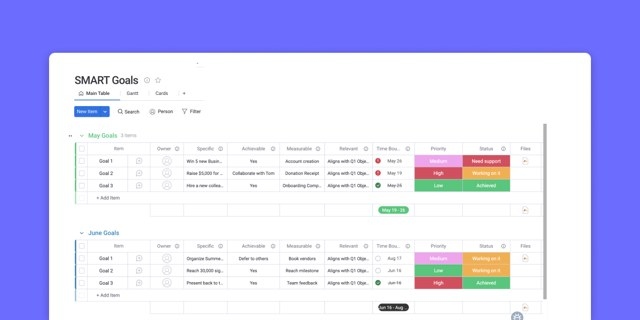

Busy teams do not always make progress on strategic goals. When daily tasks lack a clear connection to long-term objectives, reactive work can consume resources that would be better spent on higher-impact activities.
A structured weekly work plan closes that gap. It gives people clear priorities, shows how their contributions support organizational goals, and helps teams identify bottlenecks and arrange handoffs before delays develop.
What an actionable weekly work plan includes
For mid-to-large organizations, weekly planning translates quarterly goals into coordinated work across departments and gives leadership visibility into execution. Accountability depends on three essentials: an owner for every project, a firm deadline for every deliverable, and a measurable indicator for every intended result.
The core elements
Five components turn a collection of tasks into a workflow that supports accountability and strategic focus.
| Component | Purpose | Business impact |
|---|---|---|
| Strategic alignment | Connects weekly activities to quarterly or annual objectives | Ensures teams prioritize high-value work over low-impact noise |
| Resource allocation | Accounts for people, time, and budget explicitly | Prevents burnout and ensures realistic delivery schedules |
| Dependency mapping | Identifies which activities rely on others before they can begin | Prevents bottlenecks where one team waits idly for another |
| Progress tracking | Includes defined checkpoints and metrics for success | Allows leaders to monitor real-time status without constant check-ins |
| Buffer time | Reserves capacity for unforeseen priorities | Ensures a single urgent request doesn't derail the entire week |
Dashboards automatically display live project information, including budgets, goals, schedules, and resources.
Weekly plans versus daily task lists
A daily list helps an individual complete immediate tasks. A weekly plan connects that work to shared outcomes and coordinates the people needed to achieve them.
- Scope: Daily lists cover individual output; weekly plans bring together stakeholders across departments.
- Time horizon: Daily lists address immediate needs, while weekly plans anticipate milestones and bottlenecks.
- Purpose: Daily lists emphasize completed tasks; weekly plans emphasize strategic results.
- Coordination: Weekly plans explicitly account for handoffs and cross-team requirements rather than treating tasks in isolation.
12 ways to improve weekly work planning
A reliable planning process combines priorities, capacity, and coordination while leaving enough flexibility to respond when circumstances change.
1. Connect the week to strategic objectives
Start with quarterly and annual objectives, then work backward to identify the milestones needed this week. Findings from the Federal Employee Viewpoint Survey suggest that strategic alignment is a primary driver of performance: a vast majority of high-achievers report understanding how their daily tasks support their organization’s mission.
For example, a marketing team working toward a Q1 revenue target can translate it into weekly campaign launch dates, content deadlines, and ad spend allocation. Platforms such as monday.com connect individual tasks with broader goals so people can see that relationship.
2. Capture outstanding work before organizing it
Set aside 15 to 30 minutes on Friday afternoon or Monday morning for a team brain dump. Collect pending tasks, incoming requests, and ideas without trying to organize them during the session.
Afterward, categorize the items by urgency, impact, and resource requirements. A shared digital backlog also lets distributed teams contribute throughout the week without another meeting.
3. Prioritize with an impact-effort matrix
Use a 2×2 impact-effort matrix to sort the backlog into work to tackle now, schedule later, or leave out.
| Quadrant | Description | Action | Example |
|---|---|---|---|
| High impact, low effort | Quick wins | Do first | Automating a manual report |
| High impact, high effort | Strategic projects | Schedule | Launching a new product feature |
| Low impact, low effort | Fill-ins | Delegate or batch | Routine email correspondence |
| Low impact, high effort | Thankless work | Avoid or deprioritize | Reformatting internal slides |
An operations team, for instance, can use this approach to prioritize process improvements over minor visual changes to internal documentation.
4. Protect time for focused work
Schedule demanding analytical or creative tasks during peak energy hours, and keep those blocks free of meetings and interruptions.
- Creative and analytical tasks: Typically need uninterrupted sessions of 90 to 120 minutes.
- Collaborative work: Can fit into shorter blocks.
- Calendar integration: Makes unavailability visible to colleagues and helps protect focus time.
5. Leave 20% of the week uncommitted
Reserve 20% of weekly capacity—the equivalent of one day out of five—for unexpected priorities and urgent requests. The fact that 29% of workers continue working on weekends illustrates how weak weekly boundaries can allow work to spill into personal time.
Distribute this buffer across the week rather than saving it all for Friday. A project manager might leave Tuesday and Thursday afternoons open to handle emerging risks or help colleagues facing roadblocks. Treat the buffer as a strategic reserve that keeps the rest of the plan workable.
6. Schedule cross-team dependencies before individual tasks
Identify deliverables that require another team’s input, then arrange those handoffs before assigning individual work. These dependencies form the anchors of the weekly schedule.
A product launch may depend on marketing for messaging, operations for logistics, and customer service for training. Planning their handoffs first prevents teams from waiting for one another and limits delays when a dependency breaks down.
Gantt charts on monday.com give teams visibility into project scope, schedules, milestones, and dependencies.
7. Check capacity and balance workloads
Review workload distribution to see who is overloaded and who can take on more. Allocation should reflect both skill levels and how individuals work best, not just available hours.
When a bottleneck appears, redistribute tasks or change timelines before delivery or well-being suffers. The Workload View in monday.com provides an immediate view of capacity to support resource balancing and changing priorities.
8. Review progress midway through the week
A brief Wednesday check-in can catch problems while there is still time to recover. Typically held on Wednesday afternoon for 15 to 30 minutes, the review should answer three questions:
- Which work is on track?
- What has fallen behind?
- What new obstacles have appeared?
Use the session to adjust resources or expectations, not to repeat routine updates. Keeping attention on exceptions makes the review practical and action-oriented.
9. Automate recurring planning tasks
Automation reduces repetitive administration, errors, and inconsistency. Useful applications include:
- Creating weekly planning boards or standard activities every Monday morning.
- Reminding team members about approaching deadlines or unfinished items.
- Compiling weekly completion-rate summaries.
- Notifying project owners when milestones are reached or risks arise.
Specific automation recipes on monday.com remove manual data entry and status checking, leaving teams more time for technical problem-solving.
10. Make progress visible through dashboards
A weekly dashboard should bring progress, resource use, deadlines, and risks into one view. When stakeholders can check status themselves, meetings can concentrate on strategic decisions instead of information sharing.
Choose measures that suit the work: a project dashboard might emphasize timeline adherence, while an operations view might show ticket volume and resolution times. On monday.com, drag-and-drop widgets let teams customize live, high-level views of budgets, goals, schedules, and resources.
11. Plan recovery as well as contingency time
Recovery time is different from a buffer for unexpected work. It is a deliberate period of lower-intensity activity after a major milestone, giving people room to decompress and prepare for the next demanding objective.
Watch for fatigue signals such as declining quality or increased irritability. Lighter workload days or no-meeting blocks after a sprint deadline can help preserve energy before burnout develops. Research indicates that roughly one-third of employees report burnout across all working models.
12. Improve the process through weekly retrospectives
Use a 15-minute Friday afternoon retrospective to examine the planning process itself. Discuss what worked, what did not, which obstacles appeared, and what should change next week.
Follow through on the findings. If the team repeatedly overestimates capacity, revise future plans accordingly. Tracking planning effectiveness over time helps improve forecasts and build resilience.
How weekly planning supports team performance
Clearer priorities and stronger execution
Agreed weekly priorities reduce decision fatigue and the mental cost of switching between tasks. People spend less time deciding what comes next and more time delivering work that supports the week’s objectives. Benefits include less meeting time, faster decision-making, and better completion rates.
More predictable work-life boundaries
Realistic plans reduce the after-hours work and weekend catch-up caused by poor time management or unrealistic expectations. Including personal commitments and time off helps people focus during business hours and disconnect afterward. Lower stress supports employee satisfaction and retention.
Better visibility between departments
Shared plans show departments what others are doing, improving coordination and reducing duplicate effort. Leadership can also see resource requirements and potential bottlenecks across the organization.
Portfolio management capabilities in monday.com combine project data from different programs into a single high-level view.
Handling common weekly planning problems
Priorities change during the week
Assess new requests against their strategic importance, resource requirements, and effect on existing commitments. Apply a one in, one out rule: accepting a new priority means moving something else.
Explain changes to stakeholders so expectations remain clear. Acknowledge the disruption with the team as well; recognizing its impact helps maintain morale.
The team has more work than capacity
Missed deadlines, lower quality, and rising stress can signal overload. Respond by redistributing tasks, adjusting deadlines, reducing scope, or adding resources.
Weekly planning provides evidence for difficult conversations about realistic commitments. Addressing overload early protects both the team and the quality of its work.
Hybrid schedules complicate coordination
Distributed teams must account for time zones and different communication styles. Shared digital workspaces and asynchronous coordination are central to keeping plans useful.
Planning discussions can happen live, while updates and tracking happen asynchronously. Clear communication rules give remote colleagues the same access to priorities as office-based staff and help prevent bias toward people who are physically present.
Tools and templates for weekly planning
Digital team-planning platforms
Look for visual project organization, real-time collaboration, and automated tracking. A platform should accommodate the team’s workflow rather than require people to reshape their work around the software.
| Feature category | Key capability | Why it matters |
|---|---|---|
| Collaboration | Contextual communication | Keeps discussions attached to the work, reducing email clutter |
| Visualization | Multiple views (Gantt, Kanban) | Allows different stakeholders to view data in the format that suits them |
| Automation | Workflow triggers | Removes manual repetition and ensures process consistency |
| Integration | API connectivity | Connects the planning platform to the broader tech stack |
Reusable weekly work plan templates
Standardized templates speed up preparation and keep plans consistent. Depending on the team, a template can center on projects, goals, or recurring processes.
Marketing teams might use campaign launch or webinar planning templates; IT teams might use sprint planning templates. Add relevant fields, such as budget codes or risk levels, so the structure does not need rebuilding each week.
Forms on monday.com collect the information needed for project proposals and work requests.
AI-assisted planning
AI can analyze data to support human judgment through automatic categorization, workload recommendations based on historical performance, and risk identification. It can also reveal recurring patterns, such as underestimated testing time, to inform future plans.
These capabilities are increasingly available within work management platforms. Portfolio Risk Insights on monday.com scan project boards and flag potential risks by severity, helping teams identify critical issues quickly.
Putting weekly planning into practice at scale
Consistently linking daily work to strategic objectives creates a shared execution rhythm. Organizations strengthen that practice by training teams, investing in suitable platforms, and continually refining their approach.
monday.com supports cross-team visual planning by letting departments customize views of the same underlying data. Automation recipes handle recurring coordination, while real-time tracking reduces reliance on status meetings and update-request emails.
Project Manager Kendra Seier credits monday.com with providing transparency, accountability, and a central place to manage projects globally. Chief Operations Officer Duncan McHugh describes it as the connection between the support office and stores, giving the business visibility to move quickly, maintain consistency, and understand revenue impact.
Frequently asked questions
What does a weekly work plan cover?
It organizes and prioritizes activities over a seven-day period, connecting daily tasks to business objectives while coordinating resources, dependencies, and deadlines across teams.
How long should team planning take?
A typical collaborative planning session takes 30 to 60 minutes, with another 15 to 20 minutes of individual preparation.
When should teams plan the week?
Splitting the process can work well: use Friday afternoon to reflect and capture unfinished work, then finalize the plan and direction on Monday morning.
How much detail belongs in the plan?
Focus on outcomes, major milestones, and deliverables rather than scheduling every small activity hour by hour.
Does weekly planning suit remote teams?
It is especially important for remote teams because it supplies structure and alignment that would otherwise come from informal office coordination.
How should urgent requests be handled?
Define strict criteria for urgency and reserve 20% of weekly capacity as buffer time to accommodate qualifying requests.
How is weekly planning different from project management?
Weekly planning coordinates work within a specific time frame. Project management covers an initiative’s entire lifecycle, with weekly planning providing a tactical layer of execution.
How can teams evaluate planning success?
Track completion rates, deadline adherence, team satisfaction scores, and the proportion of work aligned with strategic objectives. Review these measures over time to identify where the process can improve.